ZimpleMoney uses a multi-step login process and Security Settings to protect your account from phishing and unauthorized access.
Setting Up Your Security Settings
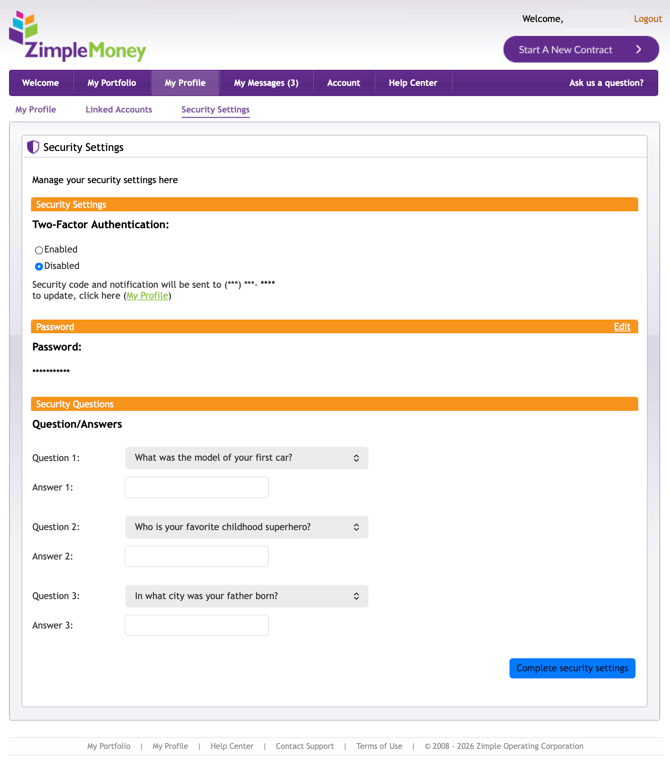
After registration, you're directed to complete your Security Settings before you can access your portfolio. This includes:
- Security Questions: Set three security questions and answers, used to verify your identity if you ever need to reset your password.
-
Two-factor authentication (2FA) adds a second layer of security to your account, reducing the risk of unauthorized access.
All new ZimpleMoney accounts have 2FA enabled by default. If you created your account before this feature was introduced, you will need to enable it manually.
To enable or disable 2FA:
-
- Log in to your ZimpleMoney account.
- Select the My Profile tab.
- Click Security Settings.
- Under Two-Factor Authentication, select Enabled or Disabled.
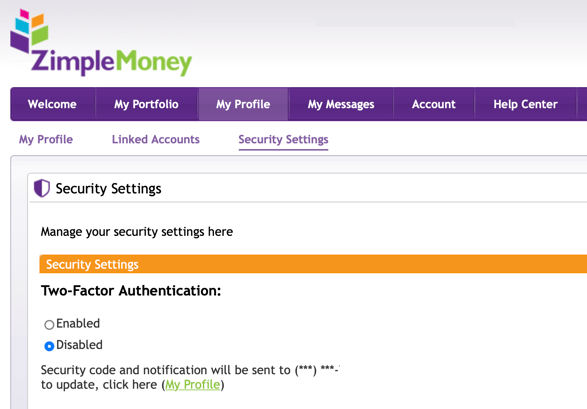
ZimpleMoney strongly recommends keeping two-factor authentication enabled at all times.
ZimpleMoney strongly recommends keeping two-factor authentication enabled at all times.
Resetting a Forgotten Password
If you have forgotten your password, you can reset it from the login screen.
- On the login page, click Forgot Password.
- Click "Click here for help" below the "Forgot your password?" prompt.
- Enter the email address associated with your ZimpleMoney account.
- Check your email inbox for a password reset email and follow the link.
- Answer all three of your security questions correctly.
- Enter a new password to complete the reset.
.jpg?width=447&height=480&name=login%20(1).jpg)
Once your reset is successful, you're logged in automatically and can use your new password for future logins. If the reset doesn't work, email support@zimplemoney.com with any answers you remember to your security questions.
Changing Your Password
- Go to My Profile > Security Settings.
- Click Edit next to Password.
- Enter your current password, then your new password (at least 8 characters with at least 1 number).
- Click Update.