
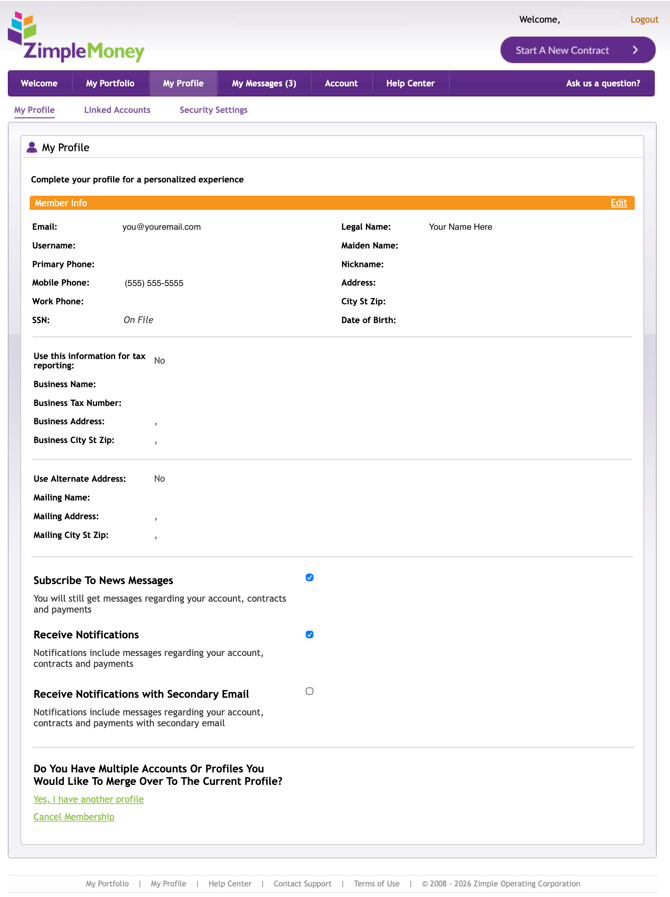
The My Profile section is where you manage your personal information and account preferences in ZimpleMoney.
Updating Your Member Information
- Go to My Profile.
- Click Edit next to your member information.
- Enter your changes, including phone number, address, or other personal details.
- Click Update to save.
- Log out and log back in to apply the change.
If you cannot log in:
Send an email from your registered email address to support@zimplemoney.com. Include your old mobile number and your new mobile number in the message.
Where to Manage Other Profile Settings
Your Profile section also connects to related settings:
- Linked Accounts: Manage your bank accounts and credit cards (see the dedicated payment methods article for full steps).
- Security Settings: Manage your password and security questions (see the dedicated login and security article for full steps).