
ZimpleMoney is required to verify that the bank account owner matches the ZimpleMoney account holder before processing ACH transactions. This is a separate process from verifying your identity.
Why does your bank account need to be verified by ZimpleMoney?
We need to authenticate and verify that the same owner of the ZimpleMoney account owns the bank account.
This is required even if you connect your bank account via Plaid.
For personal bank accounts, here's what you need to provide:
-
An image of a blank check, or
-
A recent bank statement showing your name and account number
If the bank account is not in your name, you must also provide a bank letter confirming you are an authorized signer on the account, along with the account and routing numbers and confirmation that the account supports ACH debits and credits.
For business bank accounts, here's what we need from you:
- Formation Documents (Articles of Organization/Incorporation, Certificate of Formation, State Certified Documents)
- EIN Verification (SS-4 Approval, 147C Letter, or SSN for Sole Proprietors)
- Operating Agreement (LLC) or Bylaws (Corporation)
- Government-Issued Photo ID for all 25%+ owners, directors, officers, and signers
- Bank Statement
- Bank Verification Letter
- The Corporate Bank Verification Letter must:
- Be signed by an authorized representative of the financial institution
- Identify the financial institution
- Identify the legal name of the corporation
- Confirm the account number (full or masked)
- List all authorized signers on the account
- Confirm that the signer listed within the ZimpleMoney account profile is authorized to act on behalf of the corporation
- Confirm that the signer may authorize transactions on the account without requiring a secondary signature or additional authorization
- The Corporate Bank Verification Letter must:
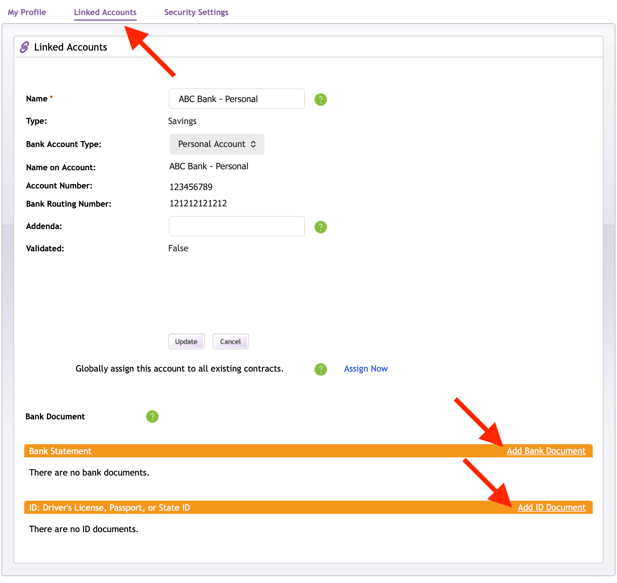
Follow these to provide your documents:
- Select the My Profile tab.
- Click Linked Accounts.
- Choose the account you want to verify.
- Click Upload and follow the steps to submit your documents.
ZimpleMoney is notified immediately upon upload and typically reviews documents within 1 business day during regular business hours.