
If you've accidentally created more than one ZimpleMoney account, you can merge them into a single profile.
How Merging Works
Merging transfers all data and ownership into your primary account and permanently deletes the secondary account. This action can't be undone, so confirm which account you want to keep as primary before you begin.
Steps to Merge Accounts:
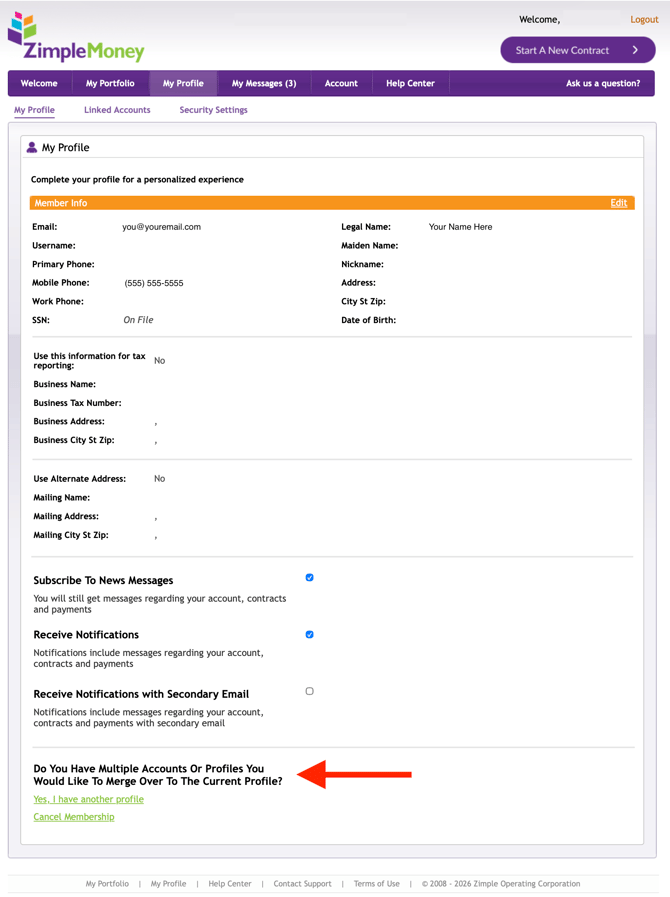
- Log in to the account you want to keep.
- Select My Profile from the title tabs.
- Scroll to the bottom of the page.
- Select "Yes, I have another profile."
- Enter the username and password of the account you want to merge.
.jpg?width=670&height=295&name=Merge%202%20(1).jpg)
Note: Once merged, the secondary account's login credentials no longer work, since that account no longer exists.