
On a loan contract with an escrow arrangement, your payment is made up of two separate components: your Next Escrow amount and your Next Payment (regular) amount. Both must be selected together to ensure your funds are split and routed correctly.
On the Payment Tab, under Regular Payments, you'll see individual checkboxes for each amount due, including Next Escrow and Next Payment, along with separate options for Extra Payment and Principal Payment.
If you only check one of these boxes—or if you use Extra Payment instead of checking both the Escrow and Payment boxes—the system won't split your funds correctly.
Extra Payment is intended for amounts paid outside your normal billing cycle, and it doesn't route any portion to escrow.
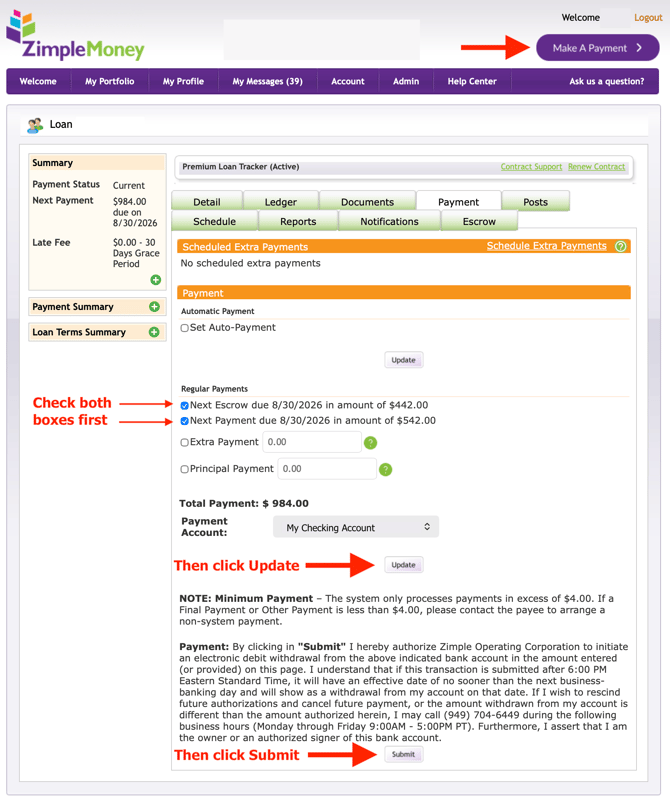
How to Submit a Split Escrow Payment Correctly
To make sure your payment is divided correctly between your regular payment and escrow:
- Go to the Payment Tab on your loan contract.
- In the Regular Payments section, check both boxes: the Regular Payment checkbox and the Escrow checkbox.
- Confirm the Total Payment amount shown reflects both portions combined.
- Confirm your payment account selection.
- Click Submit.
Already Submitted an Incorrect Payment? If you've already submitted a payment that wasn't split correctly, contact your lender. Lenders have manual entry tools available on their end that may allow them to correct or reallocate the payment on the loan ledger.